A day in the life of EventLock

The request came in at 9:40 on a Tuesday night. Here is how it becomes a paid job without eating your week.

This is the long version. One booking, followed from the first message to the final payment, with every screen the owner, the client, and the contractor see along the way, the honest math from my own business, every plan compared line by line, and the questions people ask before they start. If you want the short version, the homepage is one click back.

Free form to start · 15 days of the full Agency experience, no credit card · Contractor accounts are always free

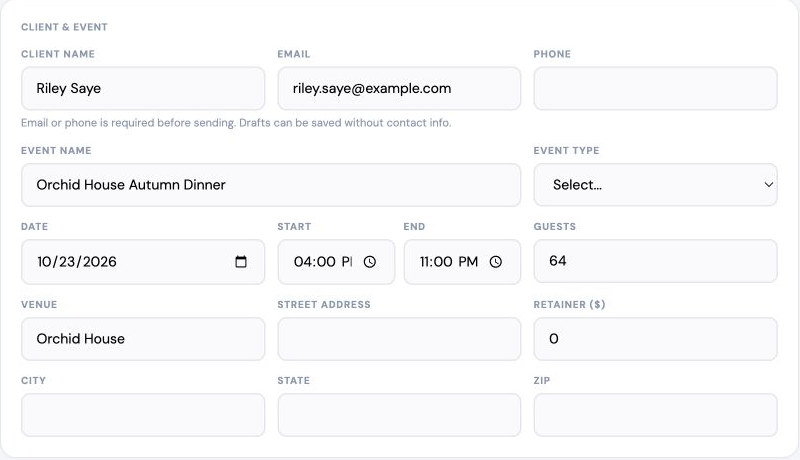
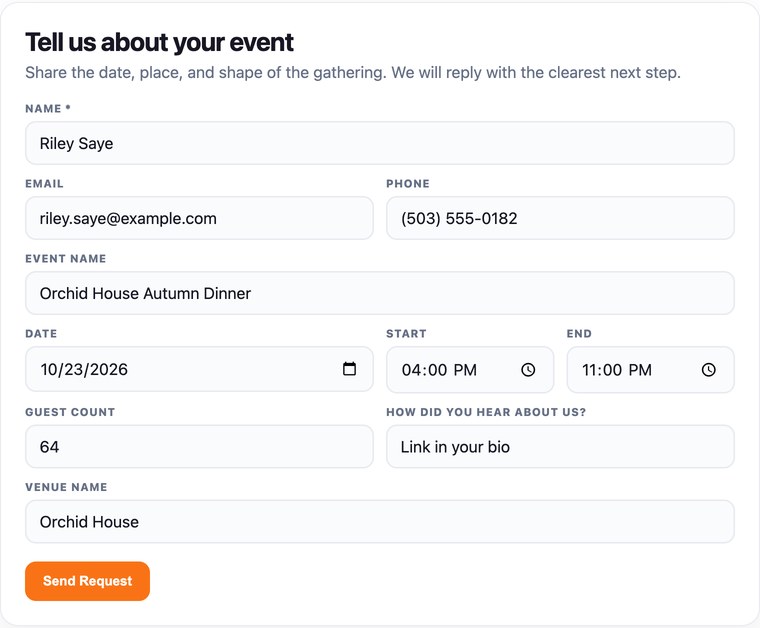
Riley Saye's request form, filled out and ready to send: her name, email, and phone, the Orchid House Autumn Dinner, Friday October 23, 2026, 4:00 PM to 11:00 PM, 64 guests, and the Orchid House as the venue.
Fig. 1Riley's request, filled out, the way a customer sends it to you.This is the booking you are about to follow. It starts below.

If you are the person who answers every inquiry, writes every quote, finds every worker, and checks every payment, you already know the problem. The work is fine. It is the paperwork around the work that follows you home.

00Get

What you get

Everything below is built and running today.

  • Type a service name and EventLock writes the client description, the contract notes for the contract, and the notes only your contractor sees. Read it, change a word, save.
  • Products work the same way, with the client description and the setup and care notes.
  • Add up to 12 example photos to any service, reorder them, and caption them. The first one is the cover.
  • On a proposal or an invoice, a service line opens into that service's photos right there in the document, full size and uncropped, without navigating away. Close it and you are back on the same line, in the same place.
  • Build a request form with your own questions, and let people attach photos, a PDF, or a floor plan when they send it.
  • Turn a request into a proposal without retyping a word of it.
  • Your client reads your cancellation and reschedule terms and signs from her phone, and the terms she signed stay frozen to the version she signed.
  • Take the deposit and the balance by card through your own connected Stripe account, or record a Zelle, Venmo, or check.
  • Send a direct offer to your first choice, or put out an open call that only reaches contractors who work in the area of the event.
  • Practice the call before you take it, against a client who is not real, with your own services and prices already loaded, and get a read on how it went when you hang up. Solo includes one hour a month and Agency includes two. Coming soon: voice coaching works on the real call too, through a Mac app that coaches you live while you are on the phone.
  • Fill a job from a roster, with a waitlist for the people who answered after the slots were gone.
  • Your people tap On my way, Arrived, and Event complete on the day, so you know where they are without texting anyone.
  • Keep every message from the client and every message from the contractor on the booking it belongs to, with a text to your phone when something needs you.
  • Rate the contractors you hire on your own private scale, seen by you and never by them.
  • Give a client a credit when a visit is cancelled, and watch it apply itself to their next invoice with one tap.
  • EventLock syncs with Google Calendar, warns you when a new booking conflicts with something already on it, and puts every confirmed job on your phone's calendar. Apple Calendar is coming soon.
  • Run your business, take jobs from other companies, and book other people from one account, with a switcher at the top of the screen.
  • Download your requests as a spreadsheet and your finance and business records whenever you want them.

01Follow

How it works

One autumn dinner, followed from the first message to paid.

The job below is made up. The steps are not. Swap in your own work, a wedding, a corporate event, a photo shoot, a cleaning route, a week of lessons. The path is the same.

Tuesday, 9:40 pm

The request.

Whose screen: Client, then Owner

Riley is planning an autumn dinner for sixty-four people at the Orchid House on Friday, October 23. She finds your form on your website or from a link in your bio. She fills in the date, the venue, how many guests, and what she is hoping for. She hits send from her couch.

On your end it lands in your request inbox already structured: contact, date, place, and the details you would normally have to ask for on the phone. You are alerted. You read it in thirty seconds and go back to your evening.

What it used to cost

Two or three messages back and forth to collect the basics. Usually a day of lag before you could quote.
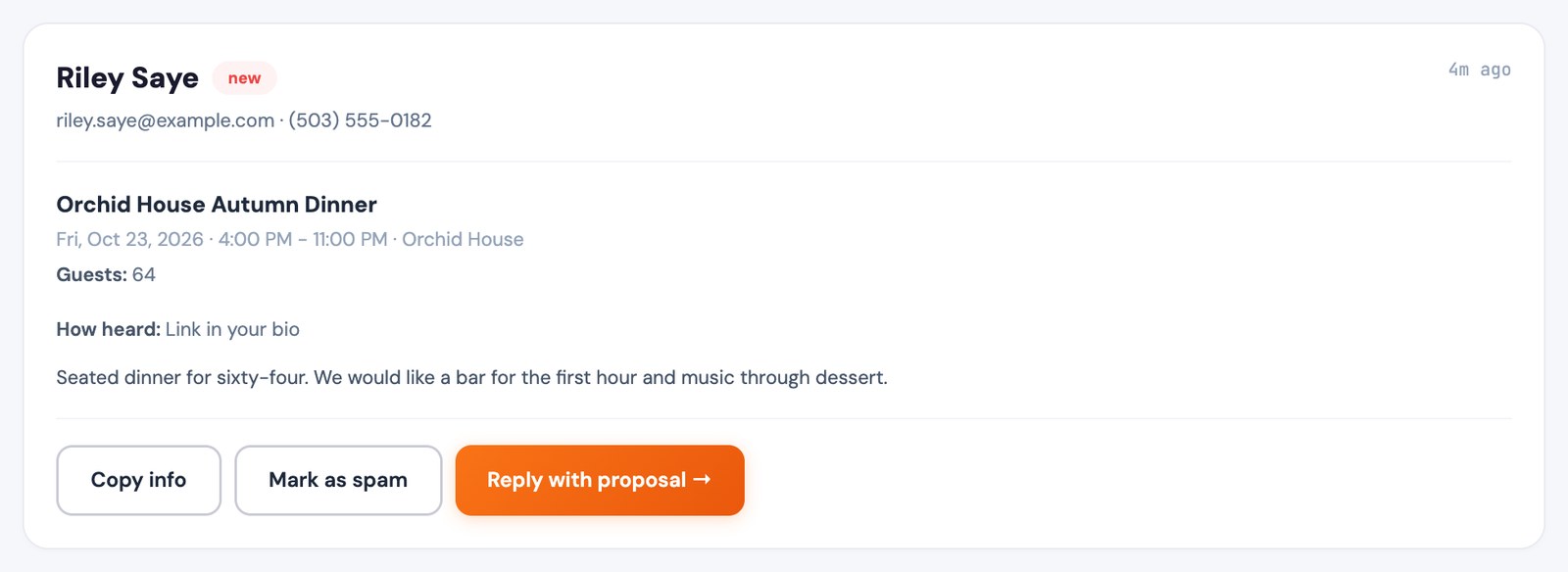
Owner's screen
Riley's request as it lands in your inbox, marked new: Riley Saye, her email and phone, the Orchid House Autumn Dinner, Friday October 23, 2026, 4:00 PM to 11:00 PM, the Orchid House, 64 guests, how she found you, and her note, with Copy info, Mark as spam, and Reply with proposal.
Fig. 2What arrives in your inbox: her request, already structured.
Wednesday, 8:15 am

The proposal.

Whose screen: Owner

Open the request, tap Create Proposal, and her name, the date, the venue, and her notes are already in it. If you have set up your services and products, they are already on the proposal. Set the deposit, set what each role pays the person doing it. The math is done for you.

If you are adding a service you have never written up, type its name. EventLock drafts the description your client reads, the contract notes for the proposal, and the notes your contractor will need. You review it, change what you want, and save it. Nothing goes out until you say so.

What it used to cost

Twenty to thirty minutes rebuilding the quote from an email thread, and a blank page every time a new service came up.

Built for speed, not software homework.

Example
You type:Cocktail-hour caricature artist

EventLock drafts the client description, the contract notes, and the contractor notes. Read it, change what you need, save it, and move on.

ReviewChangeSave
Owner's screen
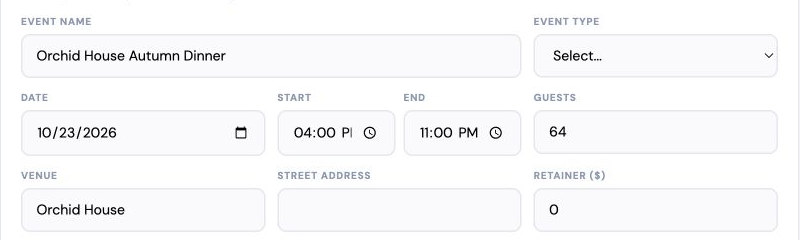
A proposal being written, with the event name, the date of October 23, 2026, the 4:00 to 11:00 PM time, 64 guests, and the venue already filled in.
Fig. 3Turn the request into a proposal without typing it all again.
Wednesday, 12:30 pm

She signs.

Whose screen: Client

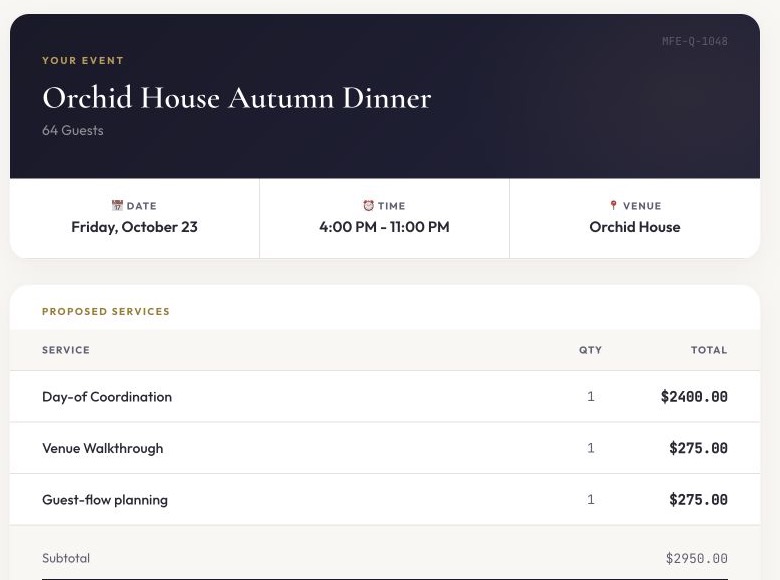
She gets a private link. On her phone she sees the services, the amounts, the date and time, and the venue. She has a question about parking at the Orchid House, so she asks it right there in the message thread, and you answer from wherever you are.

Before she signs, she reads and acknowledges your cancellation and reschedule terms. Then she signs. The signed proposal becomes the booking record, with a contract number, and the deposit is now due. She can pay it by card through your connected Stripe account, or you can record a Zelle, Venmo, or check payment when it arrives. Either way, the job shows deposit paid.

What it used to cost

A PDF attached to an email, a "did you get it?" text two days later, and a signature that lived in a photo on someone's phone.

Client's screen
The client's private proposal page for a fictional autumn dinner, showing the date, the time, the venue, three proposed services, and the subtotal.
Fig. 4The client sees the job and the price in one place.
Wednesday, 2:00 pm

You staff it.

Whose screen: Owner, then Contractor

The dinner needs someone on site to run the evening and a caricature artist for the cocktail hour. You send a direct offer to your first-choice coordinator. For the caricature role you post an open call to the people on your roster who do that work. Open calls only go to contractors who work in the area of the event. The first one to accept gets it, and anyone after that lands on the waitlist.

Each contractor sees the date, the time, the city, the pay for their role, and your instructions. They do not see the client's name or street address until the job is confirmed. They accept or pass in one tap. You see who answered and who you are still waiting on, without a single phone call.

What it used to cost

An evening of texts and voicemails, and the small dread of double-booking someone you have known for years.

Owner's screen
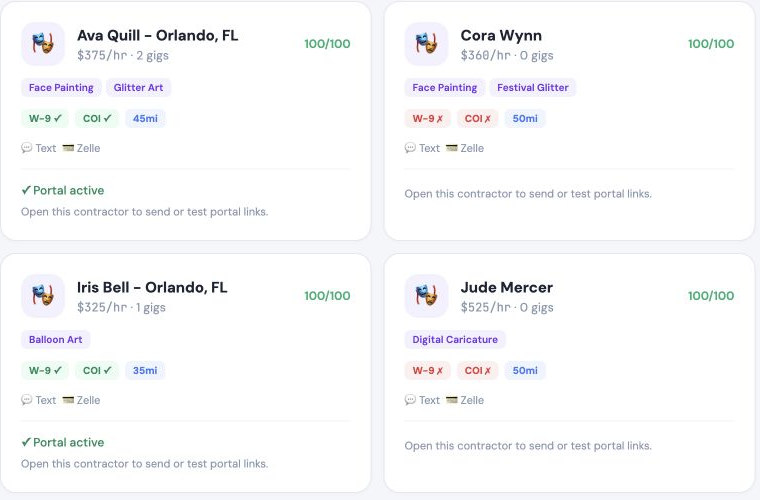
Four fictional contractors on a roster, each with their specialties, rate, travel range, and whether their W-9 and insurance are on file.
Fig. 5Find out who can work without calling everyone.
The week of

What still needs you.

Whose screen: Owner

Most days you open EventLock, look at the Action Center, and close it. It shows only what needs a decision: a signature still waiting, a deposit due, a role not yet filled, a balance coming up.

The Thursday before the dinner, Riley asks to start an hour later. She sends the request from her own booking page. You see the new time, your contractors are flagged to reconfirm, and your reschedule terms are applied the way you set them. Nobody has to dig through a thread to remember what was agreed.

EventLock syncs with Google Calendar, warns you when a new booking conflicts with something already on it, and puts every confirmed job on your phone's calendar. Apple Calendar is coming soon.

What it used to cost

Which email thread was that request in? Or was it a text? Or WhatsApp?

Example
  • A proposal is waiting for a signature
  • A deposit is still due
  • Two of three contractors have answered
  • A client asked to change a start time

See what needs you. Leave the rest alone.

Friday, 3:20 pm

Day of.

Whose screen: Contractor, then Owner

Your coordinator taps On my way. Twenty minutes later, Arrived. You are across town at a different job, and you know both of your people are where they should be without texting either of them.

What it used to cost

"Are you close?" texts during someone else's event.

Example
  • CoordinatorOn my way3:20 pm
  • CoordinatorArrived3:40 pm
  • CaricatureOn my way3:55 pm
  • CaricatureArrived4:10 pm

Know your people arrived without asking.

Monday morning

Paid.

Whose screen: Owner

The balance was due after the event. It came in by card through Stripe, so the job reads paid in full. You mark each contractor's pay as paid when you send it, so you and they both know where it stands. Every message, the signed agreement, the payments, and the people are still attached to that one job if you ever need them again.

Total time you spent running the paperwork on this booking, start to finish: about as long as it took to read this page.

What it used to cost

Three tools, one spreadsheet, and a feeling that something was still open.

Example
DepositPaid$1,000.00
BalancePaid$1,950.00
Coordinator payPaid$650.00
Caricature artist payPaid$525.00
Job total$2,950.00

Know what is paid and what is still due.

Seven stops, one date.

02Add up

The honest math

Rough minutes, from my own business. Yours will differ.

I am not going to tell you EventLock saves you eleven hours a week. I can tell you what the steps used to cost me and what they cost now. These are estimates, not measurements, and a small job is smaller than this.

The old way and the EventLock way, step by step, as rough estimates
The stepThe old wayWith EventLock
Collecting the details for a quote2 to 3 messages over a day or twoDone when the form is submitted
Building the proposal20 to 30 minutes5 to 10 minutes
Getting it signed and getting the deposit2 to 4 days of follow-upsThe client signs and pays from one link
Finding people for two rolesAn evening of calls and textsSend offers, see who answered
Knowing what is still openA Sunday-night read of every threadOne look at the Action Center
Day-of "are you close?"A few texts per jobCheck-ins come to you
Closing out the moneyA spreadsheet and a memoryPaid, due, and contractor pay on the job

Multiply that by however many jobs you run in a week. That is the part of the evening you get back.

  • The business stops following you through the rest of the day.
  • You can say yes to one more job without adding one more spreadsheet.
  • When you step away, you know nothing is quietly slipping.

03Share

Who sees what

Three people on one job. Each of them sees only their part.

The same booking looks different depending on who opens it. That is on purpose.

Most people running events are not only one of these three. You might run your own business, take on jobs as a contractor for other companies, and hire other people as a client of a different business, sometimes in the same week. EventLock does not make you choose. One login covers all three, and a switcher at the top of the screen moves you between your business workspace, your contractor portal, and your client portal.

You

Everything. The request, the proposal, the signature, the deposit, the roster, the offers, the messages, the calendar, the money. And the short list of what needs you today. On Agency, you also see who shows up and who cancels, so the next open call goes to the right people. EventLock syncs with Google Calendar, warns you when a new booking conflicts with something already on it, and puts every confirmed job on your phone's calendar. Apple Calendar is coming soon.

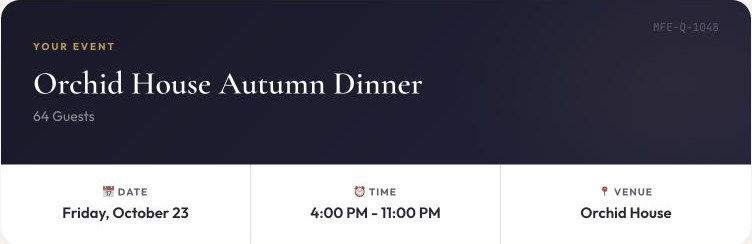
The owner's client and event record for a fictional autumn dinner: client name and email, event name, the date of October 23, 2026, the time, 64 guests, and the venue.
Fig. 6Your proposal starts with the date.

Your client

Her booking, on a private page. The proposal to review and sign, your terms, a place to ask questions and send files, her receipts, and the ability to reschedule or cancel under the terms she agreed to. She can create a free account to keep her booking history, or use the link and never sign up.

The client's event card for the same fictional dinner, showing the event name, 64 guests, Friday, October 23, 4:00 PM to 11:00 PM, and the venue.
Fig. 7Your client sees the same date, confirmed.

Your contractor

The job, on their own free account. Date, time, city, pay for their role, your instructions, the message thread with you, and the day-of check-in buttons. Client names and street addresses appear only once the job is confirmed. Their W-9 and insurance documents live on their profile so you are not asking for them every season.

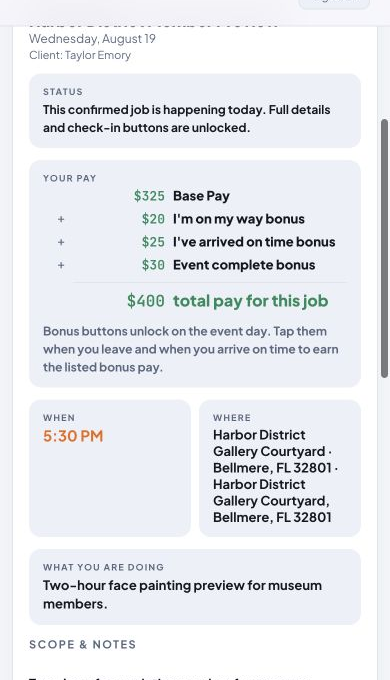
A contractor's job page on a phone for a different fictional job on August 19: the confirmed status, the pay for the role, the start time, and where to go.
Fig. 8Your contractor sees the time, the place, and the pay.

Nobody sees another company's clients. Contractors who work for more than one EventLock business keep one account and one schedule, so conflicts show up before they become problems.

04Book

For your customers

Your client gets one calm page instead of a chain of emails.

From the first form to the final receipt, the client has one place to go. The proposal reads clearly on a phone. Questions go in the message thread attached to the booking, so nothing gets lost between texts and email. Signing takes a minute. Paying the deposit by card takes another. Your cancellation and reschedule terms are shown plainly before anyone signs, so there are no surprises later.

  • Review, ask, sign, and pay from one private link
  • Download the proposal or invoice as a PDF
  • Add the event to their own calendar
  • Reschedule or cancel under the terms they agreed to
  • If a cancellation leaves a credit, it applies to their next proposal or invoice in one tap

Clients never need an account. They can create a free one to keep their booking history.

Client's screen
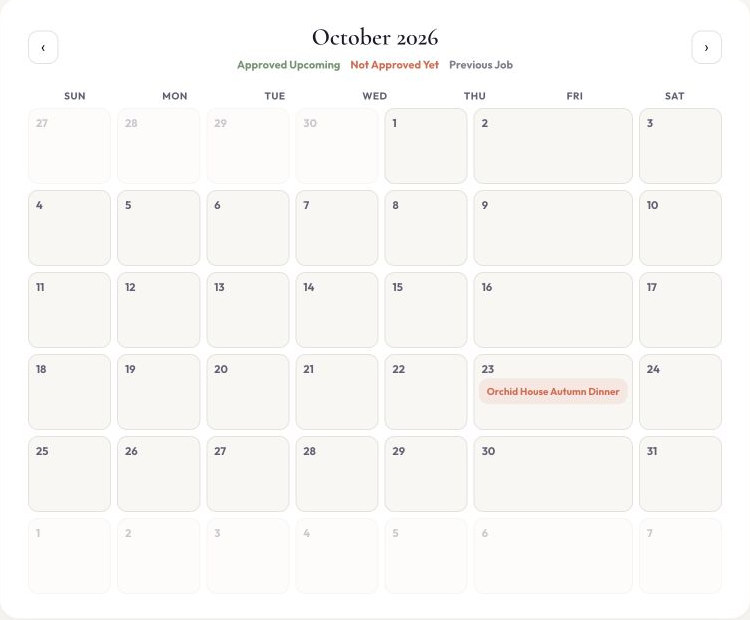
The client's October 2026 calendar with the fictional autumn dinner on Friday the 23rd, marked as not approved yet.
Fig. 9The client's calendar shows the date, and what still needs their review.

05Work

For independent contractors and performers

Get hired.

Field job offers from every company that uses EventLock, all from one free account.

Enter your services, rates, travel range, and documents once. Get offers from any business that hires through EventLock. Accept in a tap, see the pay before you say yes, and keep every job on one schedule.

  • 0%of contractor pay goes to EventLock
  • $0EventLock hiring or placement fee
  • $0EventLock transaction or client service fee
  • $0for your contractor account, always

EventLock takes 0% of contractor pay. We add no EventLock transaction, hiring, placement, or client service fee to money moving through the job.

Paid company subscription plans still apply. If a company accepts card payments, its card processor may charge its ordinary processing fees.

  • See date, time, city, and pay before you accept
  • Direct offers and open calls, first come, first served
  • Your W-9 and insurance on file, so you upload once
  • On my way and Arrived check-ins so nobody has to text you

Your one EventLock account includes your contractor profile and a free form for your own business. You do not need a second account. A switcher at the top of the screen lets you move between your business workspace, your contractor portal, and, if a company sends you a proposal to review, your client portal too.

A contractor's job page on a phone for a fictional confirmed job, showing the pay for the role with its bonuses, the start time, and where to go.
Fig. 10Know the job, where to go, and what it pays.

06Start

Start here

A form that asks the right questions before the first call.

Every EventLock form starts with the questions you need to write a proposal: who, when, where, and what. Add your own questions when your work needs more. Share it as a link or place it on your website. It looks like your business and works on a phone.

When someone submits it, the request is already in the shape of a proposal. That is the whole trick.

  • Built-in booking questions, plus your own
  • On paid plans, people can attach photos or files to their request, or snap one from their phone
  • Share a link or put it on your site
  • Every request lands in one inbox, and you are alerted

The Free plan includes one form. Forms adds more forms, more questions, and removes the EventLock name from your form.

Owner's screen
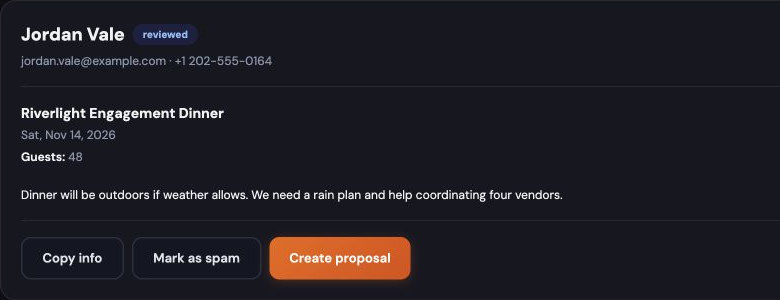
A submitted request in the owner's inbox for a different fictional event, showing the contact, the event name, the date, and the guest count.
Fig. 11Every request lands in one inbox, ready to quote.

07Set up

Your services and products

Set up your business in an afternoon, not a month.

The reason most booking software never gets used is the setup. You sign up, you are handed forty empty fields, and you go back to the spreadsheet. EventLock is built so you never rebuild your business inside an app.

Open Services, type a name, say Face Painting, and EventLock drafts three things for you: the short description your client reads on the proposal, the contract notes that ride along with it (safety, weather, setup, the fine print you always meant to write down), and the practical notes your contractor needs, like what to bring and how to dress. Read it. Fix a word or two. Save. Next service. Products work the same way, with a description and contract notes for setup, materials, and care.

Each service also gets its own example photos. Add up to 12, put the best one first, and write a caption for each. From then on they appear automatically on every proposal, invoice, and client page where that service is quoted, in a "See examples" panel the client can open and swipe through on her phone. You upload once. Every client after that sees your work right beside the price.

  • Type a service name, get a client description, contract notes, and contractor notes
  • Nothing is saved until you have read it and pressed Save
  • Up to 12 example photos per service, shown wherever that service is quoted
Owner's screen
Fig. 12Type a service name. Review what it wrote. Save.

08Why

Why this exists

I did not learn this from a survey.

I have run an event entertainment business for a long time. In our busiest year we booked, staffed, and performed more than 3,000 events. The hard part was never the work. The hard part was the hour after the work: the quote, the signature, the deposit, the six texts to find a face painter, the balance nobody remembered to send.

EventLock is the tool I wanted on those nights. I use it to run my own bookings, so when something is annoying, I am the first one it annoys.

Ed Kevorkian, founder of Imagination Overdrive

09Choose

Plans

Compare the whole path

Free and Forms let you see the complete workspace. Premium areas stay visible but locked, with the plan that unlocks them, so you can see what you would get without losing anything you have entered.

Every plan starts with 15 days of the full Agency experience. No credit card needed for the trial.

Plan prices and sign-up are on the homepage.

Swipe to compare plans

What each plan includes
CapabilityFreeFormsSoloAgency
Forms and requests
Forms, shared as a link or placed on your site1Up to 3UnlimitedUnlimited
Built-in booking questionsIncludedIncludedIncludedIncluded
Additional custom questionsUp to 2Up to 12UnlimitedUnlimited
Download your requests as a spreadsheetNot includedIncludedIncludedIncluded
Remove the EventLock name from your formNot includedIncludedIncludedIncluded
Client booking
Proposals and client signaturesVisible, locked SoloVisible, locked SoloIncludedIncluded
Invoices and payment trackingVisible, locked SoloVisible, locked SoloIncludedIncluded
Client messaging and PDFsVisible, locked SoloVisible, locked SoloIncludedIncluded
Download your finance and business recordsVisible, locked SoloVisible, locked SoloIncludedIncluded
Contractor coordination
Roster and availabilityVisible, locked AgencyVisible, locked AgencyVisible, locked AgencyIncluded
Matching, offers, and staffing for more than one roleVisible, locked AgencyVisible, locked AgencyVisible, locked AgencyIncluded
Free contractor accountsIncludedIncludedIncludedIncluded

Visible, locked means you can see the area now and it opens on the plan named beside it.

  • Running more than one company or brand?Tell us how you work. Contact us
  • Want the form and booking experience inside your own website?White-label implementation is available as a custom service. Contact us

10Ask us

Straight answers before you start.

Something specific to your business? Email hello@eventlock.app.

Can I really start for free?
Yes. Free includes one form you can share as a link or put on your site, the built-in booking questions, up to two additional custom questions, and a request inbox. You can also start with 15 days of the full Agency experience without entering a card.
How hard is setup?
Start with the form. It already has the questions you need for a proposal. Add your services when you are ready, and type a few words to get suggested descriptions you can edit. Most owners send their first proposal the same day.
What happens after someone fills out my form?
The request lands in your inbox with the date, place, contact, and details already structured. On Solo or Agency, you open it and choose Create Proposal. If you have set up your services and products, they are already on it. Just review the proposal and hit send!
How do clients sign?
They open a private link, review the proposal, acknowledge your cancellation and reschedule terms, and sign on their phone or computer. The signed proposal becomes the booking record with its own contract number, and it stays attached to the job along with every message and payment.
How do deposits and payments work?
You choose. Connect your own Stripe account and clients can pay the deposit and balance by card from their booking page. Or record Zelle, Venmo, cash, or check payments yourself. Either way, the job shows what is paid and what is still due. EventLock never stores full card numbers. Your card processor's ordinary fees apply.
Does EventLock take a cut?
No. EventLock adds no transaction, hiring, placement, or client service fee to money moving through a job. Paid company subscriptions still apply.
Are contractor accounts free?
Yes, always. A contractor keeps one EventLock account and can work with as many EventLock companies as want to hire them. EventLock takes 0% of contractor pay and charges no placement fee.
Does EventLock pay my contractors?
No. You pay your contractors the way you always have. EventLock tracks what each role pays and lets you mark it paid, so you and your contractor both know where it stands.
What do contractors see?
The date, time, city, pay for their role, your instructions, and the message thread with you. Client names and street addresses appear once the job is confirmed. They also keep their W-9 and insurance documents on their profile. EventLock stores those documents; it does not verify them.
What about cancellations and reschedules?
You set your terms. Clients see them before they sign, and the terms they signed stay with that proposal even if you change your terms later. They can request a reschedule or cancel from their booking page under those terms, and you see the change, along with which contractors need to reconfirm.
Does EventLock have a calendar?
Yes. Your booked and pending work shows on a calendar in EventLock. EventLock syncs with Google Calendar, warns you when a new booking conflicts with something already on it, and puts every confirmed job on your phone's calendar. Apple Calendar is coming soon.
Will my information carry forward if I change plans?
Yes. Your forms, requests, and jobs stay with your account when you move between plans.
Can I put the form on my own website?
Yes. Share the link or place the form on your site. If you want the whole booking experience inside your website, white-label implementation is available as a custom service. Email hello@eventlock.app.
Which plan should I choose?
Free for one request form. Forms for more forms and downloads. Solo for proposals through payment. Agency when you also find and coordinate the people you hire.

The next request is going to come in at 9:40 on a Tuesday night. Let it be easy.

Start with a free form. When the job moves forward, EventLock carries it: the proposal, the signature, the deposit, the people, the day of, and the money. You do the work. The paperwork rides along.

Free form to start · 15 days of the full Agency experience, no credit card · Contractor accounts are always free